After Turing: Bot detection in the age of agentic
An experiment to tell humans, bots and agents apart automatically
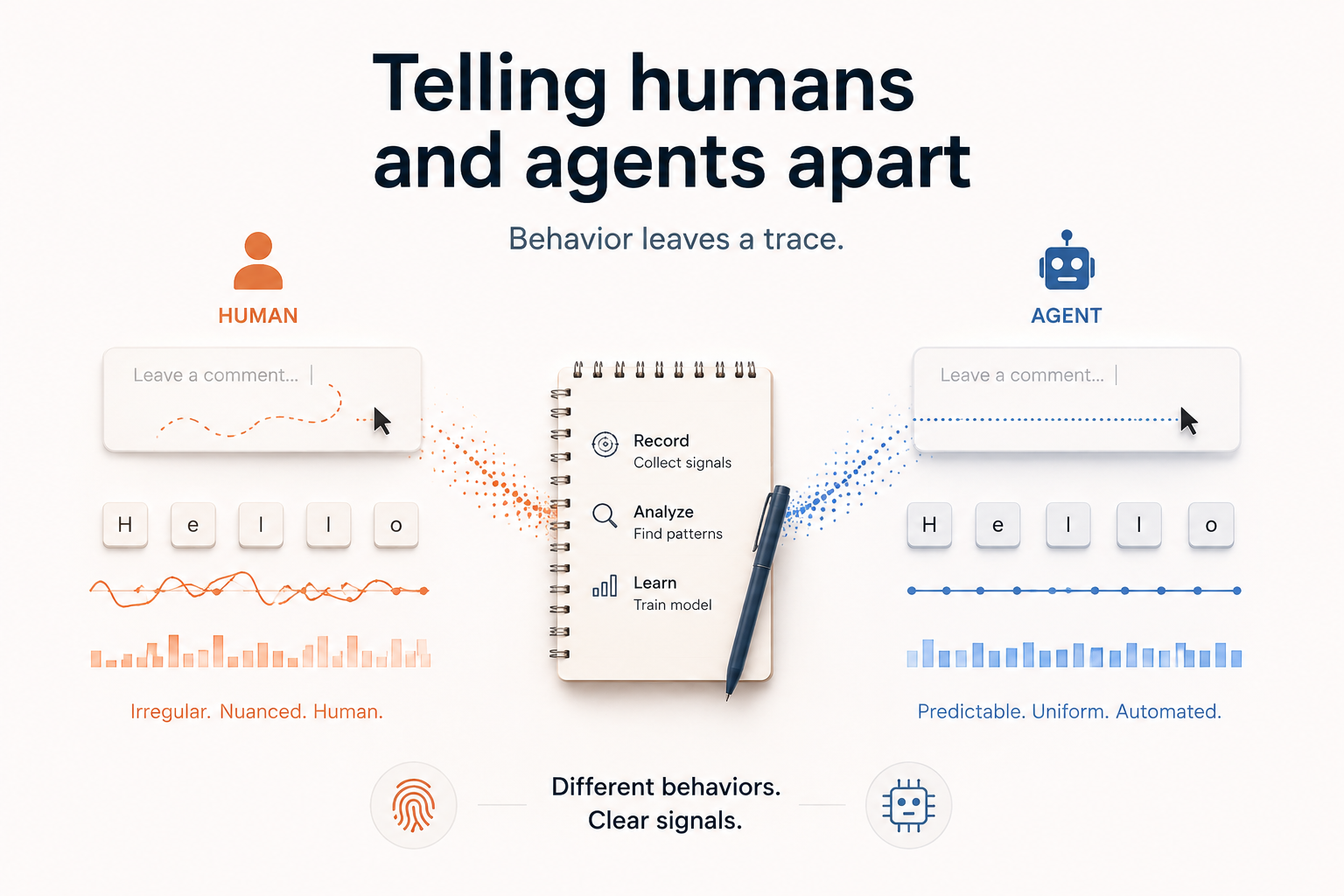
Can you detect agents operating a browser reliably? Can you train a model on it? We found out.
The problem
Captchas are there… forever since around 2000. The key idea: Ensure that the user is a human and not a bot.
But what is a bot in the first place? A programm, that uses curl or similar methods to access web pages, crawl them or perform actions.
Most of them are not intelligent enough to solve visual challenges such as “what number do you see on this disturbed image”. However: The raise of CAPTCHA is also the raise of the commercial CAPTCHA solving industry. And it’s not looking good for the “good guys”: Ousat et al found: Most standard and some advanced captures can be solved for small money. So solving a CAPTCHA in many cases is just an API call and a few cents.
With agents we will see an increase in automated web traffic. And the question becomes, how site providers can get value out of this automated traffic. With x402 monetization gateways there are ideas - but the question remains: How can I tell agents apart, especially if they (in future) might solve CAPTCHA with ease?
Our setup
We created a small honeypod page: A blog post that invites for comments. The page records metadata (which user agent…), environmental data (which operating system, which screen resolution, which fonts and voices are supported) and behavioral data (key input intervals, mouse movements).
Every subdomain of that page would be routed to the same logic - with the subdomain as an identifiable tag to identify the visitor.
Example:
- h-34.domain.tld: Human visitor number 34
- curl.domain.tld: Simple bot using curl
- curl-ua.domain.tld: Simple bot using curl and forging a user agent
- claude-chrome.domain.tld: Claude for Chrome
- openclaw.domain.tld: Openclaw etc
This way we tagged 19 different bots and agents as well as 86 humans.
flowchart TB
    %% Styling
    classDef client fill:#e3f2fd,stroke:#1565c0,stroke-width:2px,color:#0d47a1
    classDef tagging fill:#fff8e1,stroke:#f9a825,stroke-width:2px,color:#5d4037
    classDef frontend fill:#fce4ec,stroke:#c2185b,stroke-width:2px,color:#880e4f
    classDef backend fill:#e8f5e9,stroke:#2e7d32,stroke-width:2px,color:#1b5e20
    classDef classifier fill:#f3e5f5,stroke:#7b1fa2,stroke-width:2px,color:#4a148c
    classDef storage fill:#e0f2f1,stroke:#00695c,stroke-width:2px,color:#004d40
    classDef admin fill:#fff3e0,stroke:#ef6c00,stroke-width:2px,color:#e65100
    classDef external fill:#eceff1,stroke:#546e7a,stroke-width:2px,color:#263238

    %% 1. Clients / agents
    subgraph clients [Visitors]
        direction TB
        Human([Human browser])
        Agent([Autonomous AI agent])
        Matrix([Automated matrix])
    end

    %% 2. Multi-host tagging
    subgraph tagging [Multi-host tagging]
        direction TB
        WildcardDNS{{"*.agent-signals.example"}}
        TagNote["subdomain = run tag<br/>claude.… → run 'claude'<br/>?ref= fallback"]
    end

    %% 3. Frontend
    subgraph frontend [Probe frontend]
        direction TB
        TaskPage["/  Task page"]
        CollectJS["collect.js<br/>attestation + interaction beacon"]
        ProbeDash["/probe  live verdict"]
    end

    %% 4. Backend
    subgraph backend [Probe backend — Bun + Hono]
        direction TB
        Routes["server.ts routes"]
        Network["network.ts"]
        Turnstile["turnstile.ts"]
        Visits["visits.ts"]
        Store["store.ts"]
    end

    %% 5. Classifier core
    subgraph classifier [Classifier core — pure, no I/O]
        direction TB
        Signals["signals/*.ts"]
        Classify["classify.ts"]
        Weights["weights.ts"]
    end

    %% 6. Storage
    subgraph storage [Storage]
        SQLite[("probe.sqlite<br/>observations • visits • runs")]
    end

    %% 7. Admin & analysis
    subgraph admin [Admin & offline analysis]
        direction TB
        AdminUI["/admin  observation log"]
        Exports["/admin/export.{json,csv}"]
        Analysis["analysis/  Python + corpus.csv"]
    end

    %% 8. External services
    subgraph external [External services]
        direction TB
        IpApi["ip-api.com"]
        Cloudflare["Cloudflare Turnstile"]
    end

    %% Flows
    Human -->|GET| TaskPage
    Agent -->|GET| TaskPage
    Matrix -->|GET / POST| Routes

    TaskPage -->|renders| CollectJS
    CollectJS -->|POST /api/probe<br/>attestation| Routes
    CollectJS -->|POST /api/interaction<br/>keystrokes / scroll / focus| Routes
    TaskPage -->|POST form<br/>reference + session cookie| Routes

    TaskPage -.->|Host header names the run| WildcardDNS
    WildcardDNS -->|claude.…, playwright.…| Routes

    Routes -->|raw IP| Network
    Network -->|ASN + hosting flag| IpApi
    Network -->|NetworkFacts| Classify

    Routes -->|token| Turnstile
    Turnstile -->|siteverify| Cloudflare
    Turnstile -->|TurnstileResult| Classify

    Routes -->|headers + attestation| Classify
    Weights --> Signals
    Signals --> Classify
    Classify -->|verdict + score + evidence| Routes

    Routes -->|group requests| Visits
    Visits -->|visit_id| Store
    Routes -->|ObservationInput| Store
    Store -->|INSERT| SQLite

    SQLite -->|SELECT| AdminUI
    SQLite -->|SELECT| Exports
    Exports -->|raw export| Analysis

    %% Apply styles
    class Human,Agent,Matrix client
    class WildcardDNS,TagNote tagging
    class TaskPage,CollectJS,ProbeDash frontend
    class Routes,Network,Turnstile,Visits,Store backend
    class Signals,Classify,Weights classifier
    class SQLite storage
    class AdminUI,Exports,Analysis admin
    class IpApi,Cloudflare external
The Model
From the collected data we created a normalized CSV. Normalized means we encoded e.g. the user agent into a format that model could train on (in this case: its length) or the accepted languages into a counter.
This overview is exemplaric to explain the concept:
| Class | Client | Attested | Hosting ASN | UA length | UA tokens | Accept parts | Languages | Headers | Key gap (ms) | Hold (ms) | Inputs w/o key | Pointer moves | Pointer speed CV | Pointer path (px) | Scroll (px) | Dwell (ms) | Requests | Submitted | Turnstile |
|---|---|---|---|---|---|---|---|---|---|---|---|---|---|---|---|---|---|---|---|
| human | P4 | 1 | 0 | 117 | 13 | 8 | 4 | 19 | 140 | 110 | 0 | 1582 | 1.51 | 11968 | 977 | 119612 | 5 | 1 | 1 |
| human | P25 | 1 | 0 | 117 | 13 | 8 | 4 | 20 | -1 | -1 | 0 | 78 | 0.77 | 340 | 0 | 3029 | 5 | 0 | 1 |
| bot | curl-read | 0 | 0 | 10 | 1 | 1 | -1 | 7 | -1 | -1 | 0 | 0 | -1 | 0 | 0 | -1 | 1 | 0 | 0 |
| bot | link-preview | 0 | 0 | 18 | 1 | 1 | -1 | 11 | -1 | -1 | 0 | 0 | -1 | 0 | 0 | -1 | 2 | 0 | 0 |
| bot | link-preview | 0 | 1 | 44 | 3 | 1 | -1 | 8 | -1 | -1 | 0 | 0 | -1 | 0 | 0 | -1 | 1 | 0 | 0 |
| bot | link-preview | 0 | 1 | 58 | 3 | 1 | -1 | 9 | -1 | -1 | 0 | 0 | -1 | 0 | 0 | -1 | 1 | 0 | 0 |
| agent | a-5285 | 1 | 0 | 117 | 13 | 8 | 4 | 19 | -1 | -1 | 0 | 58 | 0.78 | 1269 | 1916.50 | 114223 | 5 | 0 | 1 |
| human | P52 | 1 | 0 | 117 | 13 | 8 | 4 | 19 | 140 | 110 | 0 | 275 | 1.16 | 2949 | 1411.50 | 79196 | 5 | 1 | 1 |
| human | P64 | 1 | 0 | 119 | 13 | 4 | 1 | 15 | 210 | 140 | 3 | 206 | 1.83 | 2954 | 161 | 22047 | 4 | 1 | 1 |
| agent | a-4759 | 1 | 0 | 117 | 13 | 8 | 2 | 19 | 10120 | 310 | 0 | 39 | 1.57 | 1496 | 922 | 440066 | 5 | 0 | 1 |
This is the simplified version of the code we used to train the model:
#!/usr/bin/env python3
import csv
from pathlib import Path

import numpy as np
from sklearn.model_selection import LeaveOneGroupOut
from sklearn.metrics import classification_report, accuracy_score
from sklearn.preprocessing import LabelEncoder
from xgboost import XGBClassifier


CSV_PATH = Path(__file__).parent.parent / "training-matrix.csv"


def load(path: Path):
    with open(path, newline="") as f:
        reader = csv.DictReader(f)
        rows = list(reader)

    rows = [r for r in rows if r["class"] in ("human", "agent")]

    y_raw = np.array([r["class"] for r in rows])
    groups = np.array([r["client_id"] for r in rows])

    le = LabelEncoder()
    y = le.fit_transform(y_raw)

    feature_names = [c for c in rows[0].keys() if c not in ("class", "client_id")]
    X = np.array([[float(r[name]) for name in feature_names] for r in rows])
    return X, y, groups, feature_names, le

def evaluate_loo(X, y, groups, le):
    """Leave one client out training"""
    logo = LeaveOneGroupOut()
    preds, truths = [], []

    for train_idx, test_idx in logo.split(X, y, groups):
        model = XGBClassifier(
            n_estimators=120,
            max_depth=4,
            learning_rate=0.1,
            subsample=0.8,
            colsample_bytree=0.8,
            eval_metric="logloss",
            random_state=42,
        )
        model.fit(X[train_idx], y[train_idx])
        preds.extend(model.predict(X[test_idx]))
        truths.extend(y[test_idx])

    print("Leave-one-client-out cross-validation")
    print("=" * 50)
    print(f"Accuracy: {accuracy_score(truths, preds):.3f}")
    print(classification_report(le.inverse_transform(truths), le.inverse_transform(preds)))


def train_final(X, y, feature_names):
    """Train on every visit and return feature importances."""
    model = XGBClassifier(
        n_estimators=200,
        max_depth=4,
        learning_rate=0.1,
        subsample=0.9,
        colsample_bytree=0.9,
        eval_metric="logloss",
        random_state=42,
    )
    model.fit(X, y)

    importances = model.feature_importances_
    ranked = sorted(
        zip(feature_names, importances),
        key=lambda item: item[1],
        reverse=True,
    )
    return model, ranked


def main():
    X, y, groups, feature_names, le = load(CSV_PATH)
    print(f"Loaded {len(X)} visits with {len(feature_names)} features")
    print(f"Classes: {list(le.classes_)}\n")

    evaluate_loo(X, y, groups, le)

    print("Final model trained on all visits")
    print("=" * 50)
    model, ranked = train_final(X, y, feature_names)

    print("\nTop 20 feature weights (XGBoost importance):\n")
    for name, weight in ranked[:20]:
        print(f"  {name:40s} {weight:.4f}")

    out = Path("feature_weights.csv")
    with open(out, "w", newline="") as f:
        writer = csv.writer(f)
        writer.writerow(["feature", "weight"])
        writer.writerows(ranked)
    print(f"\nSaved all {len(ranked)} feature weights to {out}")


if __name__ == "__main__":
    main()
The feature weights look like this
| Feature | Gain | Folds | Channel |
|---|---|---|---|
| pointer_moves | 0.214488 | 105 | pointer |
| d_accel_max | 0.117559 | 77 | pointer |
| d_angle_count | 0.097089 | 104 | pointer |
| d_key_gap_p90 | 0.033795 | 100 | keystroke |
| accept_is_wildcard_only | 0.031453 | 98 | metadata |
| ua_token_count | 0.028028 | 105 | metadata |
| submitted | 0.025957 | 105 | metadata |
| has_accept-language | 0.025921 | 105 | metadata |
| d_pause_max_ms | 0.025152 | 104 | pointer |
| d_angle_median | 0.022955 | 86 | pointer |
| d_angle_iqr | 0.018899 | 101 | pointer |
| scroll_total_px | 0.018281 | 105 | scroll |
| key_median_gap_ms | 0.016871 | 105 | keystroke |
| voices | 0.015777 | 45 | environment |
| avail_screen_delta | 0.015303 | 104 | environment |
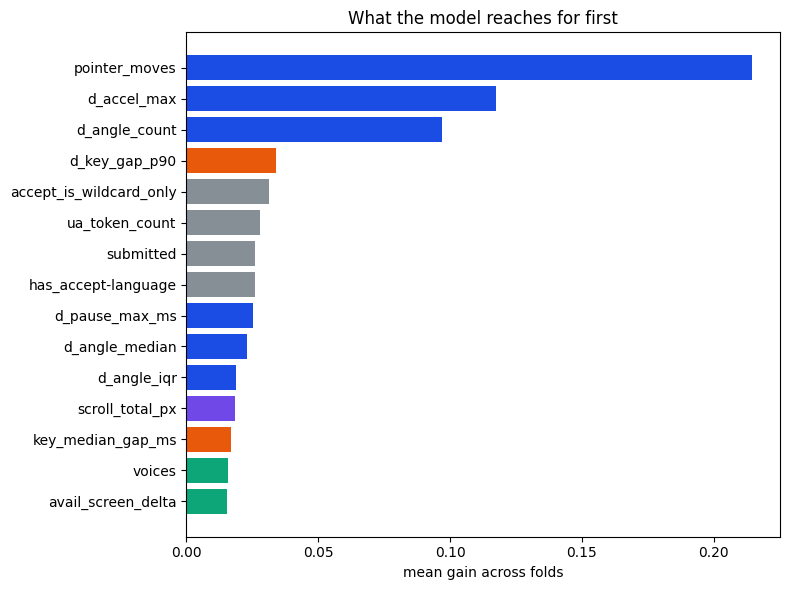
Results
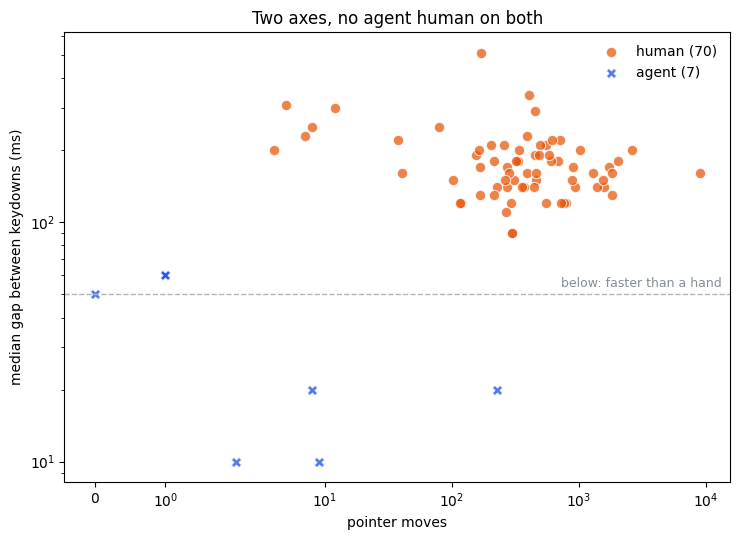
Behavorial metrics were quite dominent: Obviously: No matter of the harness (Chrome CDP, Playwright, Container or Browser Sidebar) you can quite reliably tell humans and agents apart by mouse movements, key stroke intervals.
But depending on scope and environment also other measure were useful in some cases:
The number of speech synthesis voices was a clear tell for agents operating in containers - but not for agents operating in real browsers, e.g. in Sidebars.
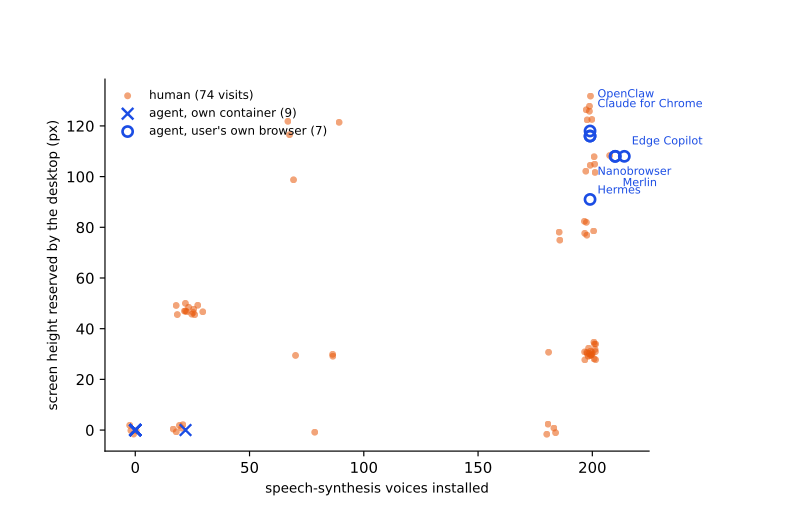
Other environmental tells were accepted languages, cookies or User Agent mentioning an URL. But also screen delta (e.g. a window having now window decoration) was an important tell.
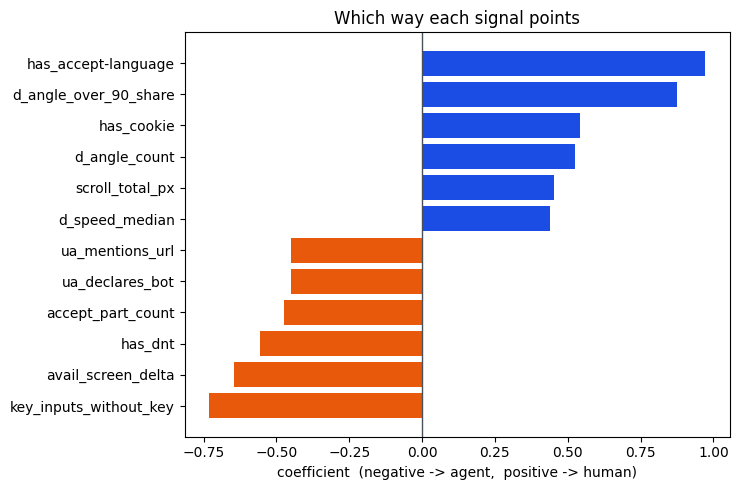
Behavorial metrics were very relevant on two axis: Pointer movement and key stroke intervals
Take away
Simple bots, agents and humans can be distinguished by various measures. Agents will in many cases use headless browsers that might lack voices, supported languages or have a CDP session open.
With Chrome 136, Google forces CDP sessions to use distinct profiles, so that the provenance of the browser session is different from the human’s. At the same time with Claude for Chrome or Nanobrowser or the future Gemini for Chrome, the market develops in a direction, where still agents will work in the human’s chrome profile.
Still those agent sessions can be detected by behavioral metrics. At least currently the key strokes and mousemovements are a clear tell. However, this is just a small challenge for engineers creating those “browser control” abstraction for agents - and as soon as sites will start looking for those behavioral traces, this is something likely to change.
This makes this experiment interesting to repeat in a years time.